概述
在主系统(User 0)中禁用/挂起高隐私风险的OPPO系统应用,包括AI功能、浏览器、广告SDK、遥测、云服务、安装扫描器、推送和行为追踪。
执行日期: 2026-02-12 ~ 2026-02-14
设备: OPPO Reno9 5G / ColorOS 15
连接方式: WiFi调试(ADB over WiFi)
ADB连接
WiFi调试配置
# 1. 在主系统中启用开发者选项
#    设置 → 关于手机 → 版本信息 → 连续点击"版本号"7次

# 2. 启用无线调试
#    开发者选项 → 无线调试 → 开启

# 3. 配对并连接
adb pair <手机IP>:<配对端口>    # 输入配对码
adb connect <手机IP>:<连接端口>

# 4. 验证连接
adb devices
adb shell am get-current-user  # 输出0=主系统, 10=系统分身
已知问题
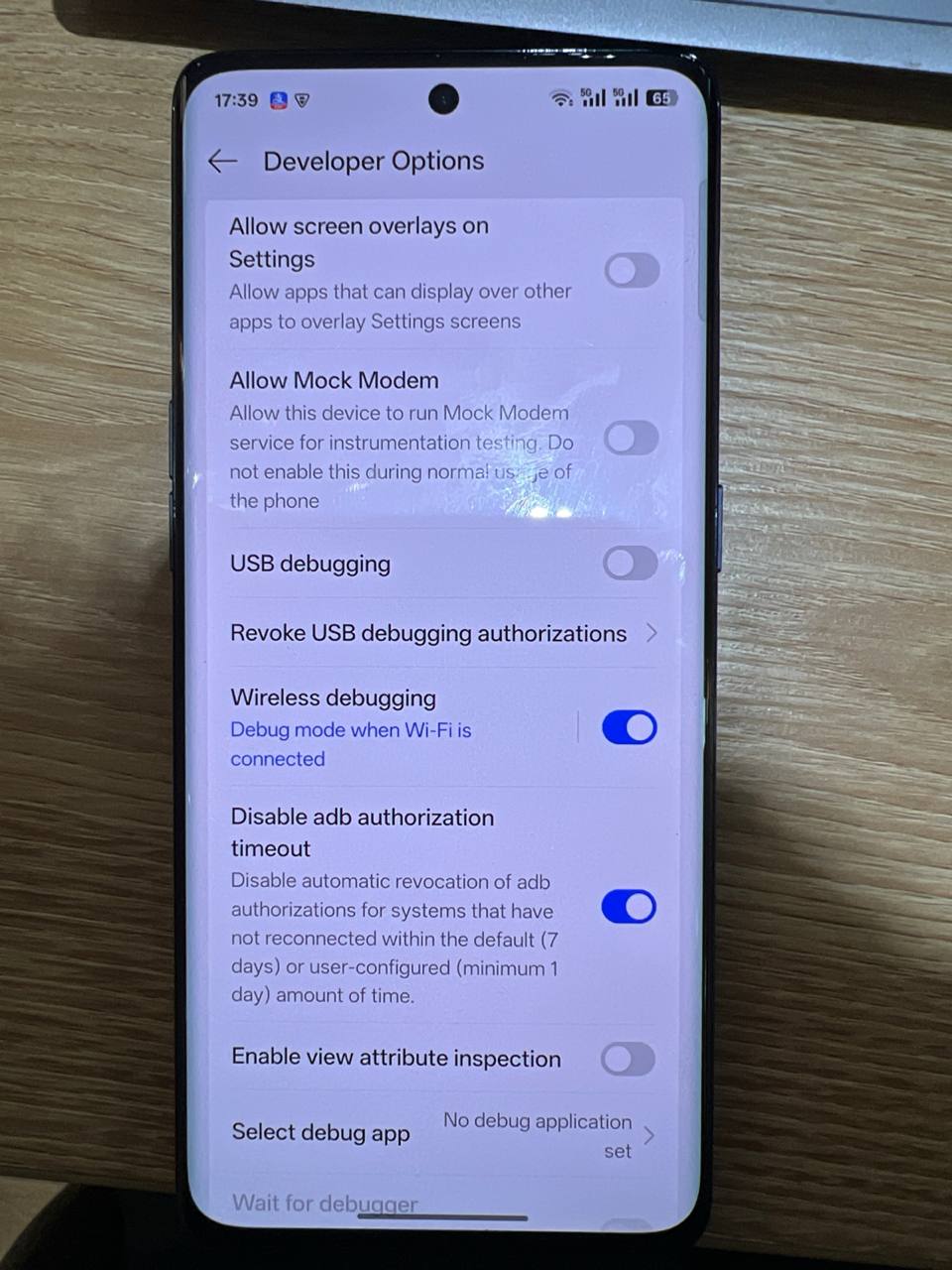
- WiFi调试频繁断开: ADB授权默认会在7天未连接后自动撤销,且连接可能因超时中断
- 解决方法:
- 开发者选项 → Disable adb authorization timeout → 开启
- 该选项禁用ADB授权的自动撤销机制(默认7天,最短1天)
- 调试期间建议同时开启”不锁定屏幕”
Debloat 执行记录
目标分类
| 类别 | 包名 | 说明 |
|---|---|---|
| AI功能 | com.oplus.aiunit |
AI单元 |
| AI功能 | com.oplus.deepthinker |
AI行为分析 |
| AI功能 | com.oplus.obrain |
AI大脑引擎 |
| AI功能 | com.aiunit.aon |
AI Always-On |
| 语音 | com.heytap.speechassist |
OPPO语音助手 |
| 语音 | com.yuemeng.speechsuite |
语音套件 |
| 浏览器 | com.heytap.browser |
OPPO浏览器 |
| 广告 | com.opos.ads |
OPPO广告SDK |
| 遥测 | com.oplus.statistics.rom |
OPPO遥测上报 |
| 云服务 | com.heytap.cloud |
OPPO云服务 |
| 扫描器 | com.oplus.athena |
应用安装扫描器 |
| 安全中心 | com.oplus.safecenter |
安全中心(含反诈代理) |
| 激活上报 | com.coloros.activation |
设备激活上报 |
| 开机注册 | com.coloros.bootreg |
开机注册服务 |
| 行为追踪 | com.oplus.onetrace |
用户行为链路追踪 |
| 日志收集 | com.oplus.logkit |
系统日志采集上传 |
| 崩溃上报 | com.oplus.crashbox |
崩溃日志回传 |
| 数据平台 | com.oplus.dmp |
数据管理平台 |
| 推送服务 | com.oplus.postmanservice |
OPPO推送服务 |
| 推送服务 | com.heytap.mcs |
HeyTap推送服务 |
| 遥测 | com.heytap.htms |
HeyTap遥测服务 |
第一批执行结果 (2026-02-12)
成功禁用(disabled-user)
adb shell pm disable-user --user 0 com.oplus.deepthinker    # ✅ disabled-user
adb shell pm disable-user --user 0 com.oplus.obrain         # ✅ disabled-user
adb shell pm disable-user --user 0 com.aiunit.aon           # ✅ disabled-user
adb shell pm disable-user --user 0 com.heytap.speechassist  # ✅ disabled-user
adb shell pm disable-user --user 0 com.yuemeng.speechsuite  # ✅ disabled-user
系统保护包 — 通过 suspend 挂起
以下3个包被ColorOS标记为核心依赖,disable-user 返回 default(拒绝),uninstall --user 0 返回 DELETE_FAILED_INTERNAL_ERROR,pm clear 被 OplusClearDataProtectManager 拦截。
最终通过 pm suspend 成功挂起:
adb shell pm suspend --user 0 com.heytap.browser   # ✅ suspended
adb shell pm suspend --user 0 com.oplus.aiunit      # ✅ suspended
adb shell pm suspend --user 0 com.opos.ads           # ✅ suspended
第二批执行结果 (2026-02-13)
成功禁用(disabled-user)
adb shell pm disable-user --user 0 com.oplus.statistics.rom  # ✅ disabled-user
adb shell pm disable-user --user 0 com.oplus.athena          # ✅ disabled-user
adb shell pm disable-user --user 0 com.heytap.cloud          # ✅ disabled-user
系统最高保护包 — 无法处理
com.oplus.safecenter(安全中心/反诈代理)具备 ColorOS 最高级别保护,三种非 root 方法均被拦截:
adb shell pm disable-user --user 0 com.oplus.safecenter  # ❌ 返回 default(拒绝)
adb shell pm suspend --user 0 com.oplus.safecenter        # ❌ suspended state: false(拒绝)
adb shell pm uninstall --user 0 com.oplus.safecenter      # ❌ DELETE_FAILED_INTERNAL_ERROR
不存在的包
com.nearme.statistics.rom   # ColorOS 15 已合并到 com.oplus.statistics.rom
com.coloros.safesdkproxy     # 本设备不存在
第三批执行结果 (2026-02-14)
成功禁用(disabled-user)
adb shell pm disable-user --user 0 com.coloros.activation    # ✅ disabled-user
adb shell pm disable-user --user 0 com.oplus.onetrace        # ✅ disabled-user
adb shell pm disable-user --user 0 com.oplus.logkit          # ✅ disabled-user
adb shell pm disable-user --user 0 com.oplus.crashbox        # ✅ disabled-user
adb shell pm disable-user --user 0 com.oplus.dmp             # ✅ disabled-user
adb shell pm disable-user --user 0 com.oplus.postmanservice  # ✅ disabled-user
adb shell pm disable-user --user 0 com.heytap.mcs            # ✅ disabled-user
系统保护包 — 通过 suspend 挂起
adb shell pm suspend --user 0 com.coloros.bootreg  # ✅ suspended (disable-user 返回 default)
adb shell pm suspend --user 0 com.heytap.htms      # ✅ suspended (disable-user 返回 default)
第四批执行结果 (2026-02-17)
成功禁用(disabled-user)
adb shell pm disable-user --user 0 com.oplus.appdetail # ✅ disabled-user(安装验证 UI)
系统级验证开关关闭
adb shell settings put global verifier_verify_adb_installs 0  # ✅
adb shell settings put global package_verifier_enable 0        # ✅
APK 完整性校验
禁用 com.oplus.appdetail 后,通过 ADB 安装 F-Droid 和 AuroraStore:
– “Sensitive permissions requested” 警告页已消失
– 安装器底部仍显示 “Installation secured by Smart Shield”(com.oplus.safecenter 无法禁用)
– 验证方法: 对比本地原始 APK 与设备上拉取的已安装 APK 的 SHA-256 哈希及 apksigner 签名证书
– 结论: 两个 APK 哈希及签名均完全一致,Smart Shield 扫描为只读操作,不会篡改 APK
com.oplus.safecenter 调研结论
经 XDA/GitHub/Reddit 多源调研,确认非 root 无法禁用。框架层 OplusForbidUninstallAppManager + OplusForbidHideOrDisableManager 拦截所有禁用/卸载操作,Canta + Shizuku 同样受限。缓解方案:通过网络层阻断遥测域名。
第五批执行结果 (2026-02-17)
目标:内容分发、应用商店、广告推荐类预装应用。
成功禁用(disabled-user)
adb shell pm disable-user --user 0 com.heytap.themestore   # ✅ disabled-user(主题商店)
adb shell pm disable-user --user 0 com.heytap.yoli          # ✅ disabled-user(Yoli 短视频)
adb shell pm disable-user --user 0 com.nearme.gamecenter    # ✅ disabled-user(游戏中心)
adb shell pm disable-user --user 0 com.oplus.games          # ✅ disabled-user(游戏服务)
adb shell pm disable-user --user 0 com.oplus.cupid          # ✅ disabled-user(系统推荐服务)
adb shell pm disable-user --user 0 com.oplus.member         # ✅ disabled-user(会员中心)
adb shell pm disable-user --user 0 com.oplus.play           # ✅ disabled-user(OPPO 应用商店)
adb shell pm disable-user --user 0 com.oppo.community       # ✅ disabled-user(OPPO 社区)
adb shell pm disable-user --user 0 com.oppo.store           # ✅ disabled-user(OPPO 商城)
adb shell pm disable-user --user 0 com.oplus.vip            # ✅ disabled-user(VIP 服务)
adb shell pm disable-user --user 0 com.coloros.video        # ✅ disabled-user(ColorOS 视频)
adb shell pm disable-user --user 0 com.coloros.karaoke      # ✅ disabled-user(卡拉OK)
系统保护包 — 通过 suspend 挂起
adb shell pm suspend --user 0 com.heytap.market    # ✅ suspended(HeyTap 应用市场,disable-user 返回 default)
adb shell pm suspend --user 0 com.heytap.pictorial  # ✅ suspended(HeyTap 壁纸杂志,disable-user 返回 default)
卸载第三方应用
adb shell pm uninstall --user 0 com.zxscnew # ✅ Success(世纪证券/前海金帆,非预装)
第六批执行结果 (2026-02-17)
目标:隐私追踪、遥测分析、语音管理、位置代理等中高风险组件。
成功禁用(disabled-user)
adb shell pm disable-user --user 0 com.oplus.metis                 # ✅ disabled-user(行为分析/推荐引擎)
adb shell pm disable-user --user 0 com.oppo.ctautoregist            # ✅ disabled-user(CT 自动注册)
adb shell pm disable-user --user 0 com.oplus.ovoicemanager          # ✅ disabled-user(语音管理)
adb shell pm disable-user --user 0 com.oplus.ovoicemanager.wakeup   # ✅ disabled-user(语音唤醒)
adb shell pm disable-user --user 0 com.oplus.locationproxy          # ✅ disabled-user(位置代理)
adb shell pm disable-user --user 0 com.coloros.remoteguardservice   # ✅ disabled-user(远程防护)
系统保护包 — 通过 suspend 挂起
adb shell pm suspend --user 0 com.heytap.tas            # ✅ suspended(HeyTap 遥测分析,disable-user 返回 default)
adb shell pm suspend --user 0 com.oplus.pantanal.ums     # ✅ suspended(用户管理服务,disable-user 返回 default)
adb shell pm suspend --user 0 com.heytap.quicksearchbox  # ✅ suspended(OPPO 搜索,disable-user 返回 default)
第七批执行结果 (2026-02-17)
目标:不需要的系统工具类预装应用(负一屏、儿童空间、车钥匙、Omoji 等)。
成功禁用(disabled-user)
adb shell pm disable-user --user 0 com.coloros.childrenspace    # ✅ disabled-user(儿童空间)
adb shell pm disable-user --user 0 com.coloros.healthcheck      # ✅ disabled-user(设备健康检查)
adb shell pm disable-user --user 0 com.oplus.omoji              # ✅ disabled-user(Omoji 表情)
adb shell pm disable-user --user 0 com.oplus.upgradeguide       # ✅ disabled-user(升级指南)
adb shell pm disable-user --user 0 com.oplus.cardigitalkey      # ✅ disabled-user(车钥匙)
adb shell pm disable-user --user 0 com.heytap.opluscarlink      # ✅ disabled-user(OPPO 车联)
adb shell pm disable-user --user 0 com.oplus.ocar               # ✅ disabled-user(OPPO 汽车)
adb shell pm disable-user --user 0 com.heytap.colorfulengine    # ✅ disabled-user(彩色引擎)
系统保护包 — 通过 suspend 挂起
adb shell pm suspend --user 0 com.coloros.assistantscreen # ✅ suspended(负一屏,disable-user 返回 default)
全部状态汇总
| 包名 | disable-user | uninstall | suspend | 最终状态 |
|---|---|---|---|---|
com.oplus.deepthinker |
✅ | – | – | 已禁用 |
com.oplus.obrain |
✅ | – | – | 已禁用 |
com.aiunit.aon |
✅ | – | – | 已禁用 |
com.heytap.speechassist |
✅ | – | – | 已禁用 |
com.yuemeng.speechsuite |
✅ | – | – | 已禁用 |
com.oplus.statistics.rom |
✅ | – | – | 已禁用 |
com.oplus.athena |
✅ | – | – | 已禁用 |
com.heytap.cloud |
✅ | – | – | 已禁用 |
com.heytap.browser |
❌ default | ❌ 拦截 | ✅ | 已挂起 |
com.oplus.aiunit |
❌ default | ❌ 拦截 | ✅ | 已挂起 |
com.opos.ads |
❌ default | ❌ 拦截 | ✅ | 已挂起 |
com.coloros.activation |
✅ | – | – | 已禁用 |
com.oplus.onetrace |
✅ | – | – | 已禁用 |
com.oplus.logkit |
✅ | – | – | 已禁用 |
com.oplus.crashbox |
✅ | – | – | 已禁用 |
com.oplus.dmp |
✅ | – | – | 已禁用 |
com.oplus.postmanservice |
✅ | – | – | 已禁用 |
com.heytap.mcs |
✅ | – | – | 已禁用 |
com.coloros.bootreg |
❌ default | – | ✅ | 已挂起 |
com.heytap.htms |
❌ default | – | ✅ | 已挂起 |
com.sohu.inputmethod.sogouoem |
– | ✅ | – | 已卸载 |
com.oplus.appdetail |
✅ | – | – | 已禁用 |
com.heytap.themestore |
✅ | – | – | 已禁用 |
com.heytap.yoli |
✅ | – | – | 已禁用 |
com.nearme.gamecenter |
✅ | – | – | 已禁用 |
com.oplus.games |
✅ | – | – | 已禁用 |
com.oplus.cupid |
✅ | – | – | 已禁用 |
com.oplus.member |
✅ | – | – | 已禁用 |
com.oplus.play |
✅ | – | – | 已禁用 |
com.oppo.community |
✅ | – | – | 已禁用 |
com.oppo.store |
✅ | – | – | 已禁用 |
com.oplus.vip |
✅ | – | – | 已禁用 |
com.coloros.video |
✅ | – | – | 已禁用 |
com.coloros.karaoke |
✅ | – | – | 已禁用 |
com.heytap.market |
❌ default | – | ✅ | 已挂起 |
com.heytap.pictorial |
❌ default | – | ✅ | 已挂起 |
com.zxscnew |
– | ✅ | – | 已卸载 |
com.oplus.metis |
✅ | – | – | 已禁用 |
com.oppo.ctautoregist |
✅ | – | – | 已禁用 |
com.oplus.ovoicemanager |
✅ | – | – | 已禁用 |
com.oplus.ovoicemanager.wakeup |
✅ | – | – | 已禁用 |
com.oplus.locationproxy |
✅ | – | – | 已禁用 |
com.coloros.remoteguardservice |
✅ | – | – | 已禁用 |
com.heytap.tas |
❌ default | – | ✅ | 已挂起 |
com.oplus.pantanal.ums |
❌ default | – | ✅ | 已挂起 |
com.heytap.quicksearchbox |
❌ default | – | ✅ | 已挂起 |
com.coloros.childrenspace |
✅ | – | – | 已禁用 |
com.coloros.healthcheck |
✅ | – | – | 已禁用 |
com.oplus.omoji |
✅ | – | – | 已禁用 |
com.oplus.upgradeguide |
✅ | – | – | 已禁用 |
com.oplus.cardigitalkey |
✅ | – | – | 已禁用 |
com.heytap.opluscarlink |
✅ | – | – | 已禁用 |
com.oplus.ocar |
✅ | – | – | 已禁用 |
com.heytap.colorfulengine |
✅ | – | – | 已禁用 |
com.coloros.assistantscreen |
❌ default | – | ✅ | 已挂起 |
com.oplus.safecenter |
❌ default | ❌ 拦截 | ❌ 拒绝 | ⚠️ 无法处理 |
ColorOS 保护机制分析
三层防护
pm disable-user拦截: 部分包返回default而非disabled-user,表示系统拒绝禁用pm uninstall --user 0拦截: 返回DELETE_FAILED_INTERNAL_ERROR,系统级保护pm clear拦截:OplusClearDataProtectManager抛出SecurityException,专门阻止ADB清除数据
java.lang.SecurityException: adb clearing user data is forbidden.
  at com.android.server.pm.OplusClearDataProtectManager
      .interceptClearUserDataIfNeeded(OplusClearDataProtectManager.java:123)
保护等级分类
根据实际测试,ColorOS 15 对系统应用有三个保护等级:
| 等级 | 可用操作 | 示例包 |
|---|---|---|
| 普通 | disable-user ✅ | com.oplus.deepthinker, com.oplus.athena, com.heytap.cloud, com.coloros.activation, com.oplus.onetrace, com.oplus.logkit, com.oplus.appdetail, com.heytap.themestore, com.nearme.gamecenter, com.oplus.games, com.oplus.cupid, com.oplus.play, com.oppo.community, com.oppo.store, com.oplus.metis, com.oppo.ctautoregist, com.oplus.ovoicemanager, com.oplus.locationproxy, com.coloros.remoteguardservice, com.coloros.childrenspace, com.oplus.omoji, com.oplus.cardigitalkey, com.oplus.ocar |
| 重要 | disable ❌, suspend ✅ | com.heytap.browser, com.oplus.aiunit, com.opos.ads, com.coloros.bootreg, com.heytap.htms, com.heytap.market, com.heytap.pictorial, com.heytap.tas, com.oplus.pantanal.ums, com.heytap.quicksearchbox, com.coloros.assistantscreen |
| 核心 | disable ❌, suspend ❌, uninstall ❌ | com.oplus.safecenter(仅 root 可处理) |
绕过策略
| 方法 | 说明 | 适用场景 |
|---|---|---|
pm disable-user |
标准禁用,最温和 | 大部分系统应用(普通等级) |
pm uninstall --user 0 |
从当前用户卸载 | 非核心保护包 |
pm suspend |
挂起应用,无法运行/接收广播 | 重要等级的顽固包 |
| Root + Magisk | 可彻底删除系统分区文件 | 核心等级包(本设备 Bootloader 锁定,不可用) |
回滚方法
如果需要恢复被禁用/挂起的包:
# 恢复被禁用的包
adb shell pm enable --user 0 com.oplus.deepthinker
adb shell pm enable --user 0 com.oplus.obrain
adb shell pm enable --user 0 com.aiunit.aon
adb shell pm enable --user 0 com.heytap.speechassist
adb shell pm enable --user 0 com.yuemeng.speechsuite
adb shell pm enable --user 0 com.oplus.statistics.rom
adb shell pm enable --user 0 com.oplus.athena
adb shell pm enable --user 0 com.heytap.cloud
adb shell pm enable --user 0 com.coloros.activation
adb shell pm enable --user 0 com.oplus.onetrace
adb shell pm enable --user 0 com.oplus.logkit
adb shell pm enable --user 0 com.oplus.crashbox
adb shell pm enable --user 0 com.oplus.dmp
adb shell pm enable --user 0 com.oplus.postmanservice
adb shell pm enable --user 0 com.heytap.mcs

# 恢复第五批禁用的包
adb shell pm enable --user 0 com.heytap.themestore
adb shell pm enable --user 0 com.heytap.yoli
adb shell pm enable --user 0 com.nearme.gamecenter
adb shell pm enable --user 0 com.oplus.games
adb shell pm enable --user 0 com.oplus.cupid
adb shell pm enable --user 0 com.oplus.member
adb shell pm enable --user 0 com.oplus.play
adb shell pm enable --user 0 com.oppo.community
adb shell pm enable --user 0 com.oppo.store
adb shell pm enable --user 0 com.oplus.vip
adb shell pm enable --user 0 com.coloros.video
adb shell pm enable --user 0 com.coloros.karaoke

# 恢复第七批禁用的包
adb shell pm enable --user 0 com.coloros.childrenspace
adb shell pm enable --user 0 com.coloros.healthcheck
adb shell pm enable --user 0 com.oplus.omoji
adb shell pm enable --user 0 com.oplus.upgradeguide
adb shell pm enable --user 0 com.oplus.cardigitalkey
adb shell pm enable --user 0 com.heytap.opluscarlink
adb shell pm enable --user 0 com.oplus.ocar
adb shell pm enable --user 0 com.heytap.colorfulengine

# 恢复第六批禁用的包
adb shell pm enable --user 0 com.oplus.metis
adb shell pm enable --user 0 com.oppo.ctautoregist
adb shell pm enable --user 0 com.oplus.ovoicemanager
adb shell pm enable --user 0 com.oplus.ovoicemanager.wakeup
adb shell pm enable --user 0 com.oplus.locationproxy
adb shell pm enable --user 0 com.coloros.remoteguardservice

# 解除挂起的包
adb shell pm unsuspend --user 0 com.heytap.browser
adb shell pm unsuspend --user 0 com.oplus.aiunit
adb shell pm unsuspend --user 0 com.opos.ads
adb shell pm unsuspend --user 0 com.coloros.bootreg
adb shell pm unsuspend --user 0 com.heytap.htms
adb shell pm unsuspend --user 0 com.heytap.market
adb shell pm unsuspend --user 0 com.heytap.pictorial
adb shell pm unsuspend --user 0 com.heytap.tas
adb shell pm unsuspend --user 0 com.oplus.pantanal.ums
adb shell pm unsuspend --user 0 com.heytap.quicksearchbox
adb shell pm unsuspend --user 0 com.coloros.assistantscreen

# 恢复已卸载的包(需恢复出厂或通过系统更新)
# com.sohu.inputmethod.sogouoem — 已从 User 0 卸载,无法通过 ADB 恢复
输入法替换记录 (2026-02-13)
安装 Gboard 替代搜狗输入法
背景: 系统预装搜狗输入法(com.sohu.inputmethod.sogouoem)具备云端上传和 AI 语义分析能力,存在严重隐私风险。
安装流程:
-
获取 APK: 从 APKPure 下载 XAPK 格式的安装包
– 版本:Gboard 16.7.4.861137547-release-arm64-v8a
– 来源: https://apkpure.com/gboard-the-google-keyboard-app/com.google.android.inputmethod.latin -
XAPK 安装方法: XAPK 是 ZIP 格式的 split APK 包,需解压后使用
adb install-multiple
“`bash
# 解压 XAPK
unzip Gboard_xxx.xapk -d gboard_extracted/
# 通过 ADB 安装 split APK
adb install-multiple -r \
gboard_extracted/com.google.android.inputmethod.latin.apk \
gboard_extracted/config.xxxhdpi.apk
“`
- 启用 Gboard 为输入法:
“`bash
# 启用
adb shell ime enable com.google.android.inputmethod.latin/com.android.inputmethod.latin.LatinIME
# 在手机上设为默认: 设置 → 系统设置 → 键盘和输入法 → 选择 Gboard
“`
-
下载中文语言包: 在 Gboard 设置中添加中文(简体)
-
卸载搜狗输入法:
bash

adb shell pm uninstall --user 0 com.sohu.inputmethod.sogouoem # ✅ Success -
验证: 确认仅剩 Gboard
bash

   adb shell ime list -s

   # com.google.android.inputmethod.latin/com.android.inputmethod.latin.LatinIME
注意事项
- XAPK 不能直接
adb install,必须解压后用adb install-multiple - 安装 Gboard 后需先在手机上手动切换为默认输入法,再卸载搜狗
- 建议在 Gboard 设置中关闭”使用情况统计”等可选的数据收集项
待办事项
- [ ] 在系统分身(User 10)中执行更全面的debloat
- [x] ~~禁用遥测组件~~
com.oplus.statistics.rom已禁用;com.nearme.statistics.rom在 ColorOS 15 中不存在 - [x] ~~禁用安全中心相关组件~~
com.oplus.safecenter三重保护无法处理(需 root);com.coloros.safesdkproxy不存在 - [x] ~~禁用应用安装扫描器~~
com.oplus.athena已禁用 - [x] ~~禁用云服务~~
com.heytap.cloud已禁用 - [x] ~~禁用追踪/推送/日志组件~~
activation,bootreg,onetrace,logkit,crashbox,dmp,postmanservice,mcs,htms已处理 - [x] ~~安装替代应用(Firefox, Gboard)后禁用系统浏览器和输入法~~ Gboard 已完成,Firefox 待安装
- [x] ~~禁用中高危应用(应用商店、主题商店、游戏中心、内容分发等)~~ 第五批已全部处理
- [x] ~~禁用中危应用(语音管理、搜索、位置代理等)~~ 第六批已全部处理
- [ ] 安装 Firefox 替代夸克浏览器
- [ ] 在系统分身(User 10)中执行更全面的debloat
- [ ] 系统更新后检查被禁用的包是否被重新启用
最后更新: 2026-02-17 (第七批 debloat — 不需要的系统工具 9 包处理)